Imagine receiving an alert on your phone while grocery shopping, reminding you that you’re low on milk—sent directly from your refrigerator. This isn’t futuristic fantasy; it’s the everyday reality of Wi-Fi enabled counter-depth refrigerators. These sophisticated appliances merge seamless kitchen design with intelligent connectivity, transforming how we interact with the heart of our homes.
As smart home technology evolves from novelty to necessity, homeowners increasingly seek appliances that offer both aesthetic appeal and digital convenience. Counter-depth refrigerators already solve the common kitchen design challenge of bulky appliances protruding into walkways. When you add Wi-Fi connectivity and smartphone app control, you get a appliance that not only looks built-in but also thinks ahead for you. Let’s explore everything you need to know before investing in this game-changing kitchen technology.
Top 10 Wi-Fi Enabled Counter-Depth Refrigerators for Smartphone Control
Detailed Product Reviews
1. 23 cu. ft. Smart wi-fi Enabled InstaView™ Door-in-Door® Counter-Depth Refrigerator with Craft Ice™ Maker
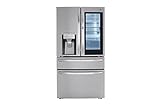
Overview: The LG LRMVC2306S brings premium refrigeration to the modern kitchen with its 23 cubic feet of counter-depth storage. This 4-door French door configuration combines the convenience of InstaView technology—allowing you to knock twice and see inside without opening the door—with the luxury of slow-melting craft ice spheres. The Wi-Fi connectivity integrates seamlessly with LG’s ThinQ app for remote temperature control and diagnostics.
What Makes It Stand Out: The 4-door design sets this model apart, offering a versatile middle drawer that’s perfect for deli items, beverages, or party platters at customizable temperatures. The Door-in-Door feature reduces cold air loss by up to 47% when accessing frequently used items, while the spherical craft ice maker automatically produces three perfect spheres daily without manual trays.
Value for Money: At $3,578, this refrigerator sits at the sweet spot for premium features without flagship pricing. Comparable Samsung or KitchenAid models with craft ice and door-in-door functionality typically exceed $4,000. The counter-depth design provides built-in aesthetics for a fraction of true built-in costs, delivering strong ROI for kitchen renovations.
Strengths and Weaknesses: Pros: Innovative 4-door flexibility; slow-melting craft ice; excellent temperature consistency; smart home integration; reduces energy waste with InstaView. Cons: 23 cu. ft. may feel small for large families; craft ice production limited to 3 spheres/day; premium price over standard French door models; requires robust Wi-Fi for full functionality.
Bottom Line: Ideal for tech-savvy homeowners seeking luxury features and elegant design without the absolute highest price tag. The LRMVC2306S delivers impressive innovation and style that justifies its premium positioning.
2. 23 cu. ft. Smart wi-fi Enabled InstaView™ Door-in-Door® Counter-Depth Refrigerator with Craft Ice™ Maker

Overview: This premium LG refrigerator packages advanced cooling technology into a sleek counter-depth French door design. The 23 cubic foot capacity is optimized with smart storage solutions and dual ice makers that ensure you never run out of ice. Wi-Fi connectivity through LG’s ThinQ platform allows for remote monitoring and control, while the InstaView panel illuminates interior contents with two simple knocks.
What Makes It Stand Out: The dual ice maker system is the star feature, simultaneously producing both regular cubed ice through the door dispenser and spherical craft ice in the freezer. LG’s Smart Cooling technology employs digital sensors and linear compressor precision to maintain optimal humidity and temperature levels. The integration of Door-in-Door access minimizes temperature fluctuations while providing quick grab-and-go convenience.
Value for Money: Priced at $4,089, this model commands a premium over its sibling but delivers enhanced performance. The dual ice maker configuration alone adds significant utility for entertainers, while Smart Cooling technology ensures superior food preservation compared to standard models. For households that prioritize ice variety and optimal freshness, the $500 premium translates to tangible daily benefits.
Strengths and Weaknesses: Pros: Dual ice makers eliminate ice shortages; superior Smart Cooling technology; elegant counter-depth integration; robust app control; Door-in-Door reduces energy loss. Cons: Highest price tier for this size; 23 cu. ft. capacity limits bulk storage; craft ice production can be slow; stainless steel finish shows fingerprints; complex features may overwhelm some users.
Bottom Line: Perfect for serious entertainers and culinary enthusiasts who demand the best ice options and precise preservation. The enhanced cooling technology and dual ice system justify the premium investment for those who’ll utilize these advanced capabilities.
Understanding Wi-Fi Enabled Counter-Depth Refrigerators
The Evolution from Standard to Smart
Refrigerators have come a long way from simple iceboxes. The journey from basic cooling units to today’s smart appliances reflects our broader relationship with technology. Standard refrigerators kept food cold. Then came ice makers and water dispensers. Now, Wi-Fi connectivity represents the third major evolution—transforming your fridge from a passive appliance into an active kitchen assistant.
Smart refrigerators maintain all the functionality of traditional models while adding layers of connectivity, monitoring, and control. The integration of sensors, cameras, and Wi-Fi modules allows these appliances to communicate with your smartphone, providing real-time data and remote access to core functions. This shift mirrors how smartphones evolved from simple communication devices to essential life management tools.
What “Counter-Depth” Really Means
The term “counter-depth” often creates confusion. Unlike standard refrigerators that typically extend 30-36 inches deep, counter-depth models align with standard kitchen counters at approximately 24-30 inches deep (excluding handles). This creates a flush, built-in appearance without the custom installation costs.
However, this streamlined design impacts interior capacity. You’ll generally sacrifice 2-6 cubic feet compared to standard-depth models. The smart features in Wi-Fi enabled versions help offset this limitation through superior organization tools and inventory management systems that maximize usable space efficiency.
Why Choose a Smart Counter-Depth Refrigerator?
Lifestyle Benefits
The primary advantage lies in proactive kitchen management. Remote temperature monitoring ensures food safety during power outages or accidental setting changes. Vacation mode controls let you optimize energy usage while away. For busy families, the ability to check contents while at the store eliminates second-guessing and reduces food waste.
These refrigerators also learn usage patterns. They can alert you when the door has been left open during hectic mornings or when temperature fluctuations suggest a potential mechanical issue before it becomes catastrophic. This predictive capability transforms maintenance from reactive to preventive.
Kitchen Aesthetics and Space Optimization
Counter-depth design creates visual continuity in open-concept homes. The refrigerator doesn’t dominate the kitchen sightlines but integrates seamlessly into cabinetry. Smart features enhance this integration through minimal external controls—many functions move to the app, creating cleaner lines.
The reduced depth also improves kitchen workflow. You’ll gain precious floor space in galley kitchens or compact urban apartments. The smart inventory features become even more valuable in these smaller-capacity models, helping you maintain optimal stock levels without overcrowding.
Key Smart Features to Look For
Temperature Management and Zone Control
Advanced models offer precise temperature control for multiple zones beyond the standard fridge and freezer compartments. Look for customizable temperature drawers that can switch between refrigeration and freezing modes. App control should allow adjustments in 1-degree increments and provide temperature history graphs.
Some systems feature rapid cooling or freezing modes activated remotely—perfect when you’re heading home with groceries and want to prepare the fridge for a new load. The best implementations maintain temperature stability within ±1°F, crucial for food preservation.
Door Alarm and Open Notifications
While basic door alarms have existed for years, smart versions send notifications to your phone instead of just beeping in an empty house. Advanced systems can identify which specific door or drawer was left ajar and estimate how long it remained open.
This feature proves invaluable for families with children or during entertaining when frequent access might lead to accidental openings. Some apps even track door-opening patterns, helping you identify if the seal needs replacement when open-duration times increase.
Filter Replacement Tracking
Water and air filter tracking moves beyond simple timer-based reminders. Smart refrigerators monitor actual usage and water flow rates, providing accurate replacement alerts based on real consumption rather than arbitrary six-month schedules.
The app should display current filter status, estimated remaining life, and one-click ordering for replacements. This ensures optimal water quality and ice production while preventing premature filter changes that waste money.
Energy Monitoring
Real-time energy consumption data helps you understand your refrigerator’s operating costs. Quality apps display daily, weekly, and monthly usage patterns, often translating kilowatt-hours into dollar amounts based on your local utility rates.
This transparency reveals how features like ice makers, door-in-door access, and smart cooling modes impact efficiency. Some systems suggest optimization strategies, such as adjusting temperatures seasonally or identifying peak usage times when you might minimize door openings.
Internal Cameras and Inventory Management
Interior cameras represent the most futuristic smart feature. Multiple lenses capture fridge contents, accessible via the app while shopping. The best implementations use AI to identify items, track expiration dates, and auto-generate shopping lists.
Look for systems with door-mounted cameras that activate when closed, avoiding the fogging issues that plague poorly placed lenses. The accompanying app should allow manual item tagging and provide search functionality when you’re trying to remember if you have mustard.
App Control Capabilities: What Can You Actually Do?
Remote Temperature Adjustment
App-based temperature control extends beyond simple up/down buttons. Sophisticated interfaces display current temperatures for each zone, allow preset configurations (like “Party Mode” or “Vacation”), and show how adjustments affect energy consumption.
The most useful implementations include temperature change confirmation—ensuring your command was received and implemented. Some even provide estimated time to reach the new temperature, helping you plan when storing sensitive items.
Shopping List Integration
Smart refrigerators with inventory cameras can automatically populate shopping lists when items run low. The best apps integrate with popular grocery delivery services, allowing you to order directly from the refrigerator’s inventory screen.
Manual list creation should be intuitive, with barcode scanning capabilities for adding items not captured by cameras. Look for apps that sync across family members’ devices and categorize items by store section for efficient shopping.
Diagnostic Tools
When problems arise, smart refrigerators can run self-diagnostics and transmit error codes to your phone. This eliminates the guesswork of interpreting beeping patterns or flashing lights. The app should explain issues in plain language and suggest troubleshooting steps.
Advanced systems can share diagnostic data directly with manufacturer service departments, potentially enabling remote fixes or ensuring technicians arrive with correct parts. This reduces service visit frequency and resolves issues faster.
Usage Analytics
Understanding your refrigerator habits helps optimize food storage and energy use. Apps track peak access times, average door-open duration, and temperature fluctuations. This data reveals patterns—perhaps your family accesses snacks most between 3-4 PM, suggesting you should pre-portion items for quick access.
Some systems correlate external weather data with compressor run times, helping you understand how ambient temperature affects performance. This information proves valuable when evaluating if your kitchen HVAC needs adjustment.
Smart Home Integration Ecosystems
Compatibility with Alexa, Google Home, and Apple HomeKit
Seamless integration with your existing smart home ecosystem determines long-term satisfaction. Alexa-enabled refrigerators allow voice queries like “Alexa, is the refrigerator door open?” or “Add milk to my shopping list.” Google Home integration offers similar capabilities plus visual responses on Nest Hub displays.
Apple HomeKit support provides Siri voice control and automation through the Home app—crucial for iPhone-centric households. The best implementations support multiple platforms simultaneously, giving you flexibility as your smart home evolves.
IFTTT and Advanced Automation
IFTTT (If This Then That) compatibility unlocks creative automation possibilities. You could program your smart lights to flash when the refrigerator door remains open, or have your thermostat adjust when the fridge enters high-usage mode. Some manufacturers offer proprietary automation platforms with pre-built recipes for common scenarios.
Look for refrigerators that support Matter, the new universal smart home standard. This future-proofs your investment, ensuring compatibility with devices from different manufacturers for years to come.
Connectivity Requirements and Setup
Wi-Fi Standards and Bandwidth Needs
Most smart refrigerators require 2.4GHz Wi-Fi networks, though premium models support 5GHz for faster data transfer. Internal cameras and frequent status updates consume minimal bandwidth—typically under 5 Mbps—but require stable connections.
If your refrigerator sits far from your router, consider a Wi-Fi extender or mesh network system. Metal appliances and kitchen cabinetry create signal barriers. Some manufacturers recommend minimum signal strength of -70 dBm for reliable operation.
Initial Setup Process
Setup typically involves downloading the manufacturer’s app, creating an account, and connecting the refrigerator to your network. The process should take under 15 minutes with clear, step-by-step instructions. Look for models with QR code pairing—scanning a code on the fridge should auto-configure most settings.
Be prepared for firmware updates during initial setup, which can take 20-30 minutes. The refrigerator should function normally during updates, though smart features may be temporarily unavailable. Quality apps provide progress indicators and completion notifications.
Security and Privacy Considerations
Data Encryption and Protection
Your refrigerator collects sensitive data—when you’re home, eating habits, and potentially kitchen photos. Ensure the manufacturer uses end-to-end encryption for data transmission and storage. Look for AES-256 encryption standards and transparent privacy policies detailing what data is collected and how it’s used.
Reputable manufacturers undergo third-party security audits and comply with standards like GDPR or CCPA. Check if the app offers two-factor authentication for account access, preventing unauthorized control of your appliance.
Camera Privacy Concerns
Interior cameras raise legitimate privacy questions. Verify that camera feeds are encrypted and stored locally on the refrigerator, not uploaded to cloud servers unless you explicitly enable backup. Physical camera shutters or disable switches provide additional peace of mind.
Understand who can access your camera feed. The app should require authentication for each viewing session and log all access attempts. Some families choose to disable cameras entirely, relying on manual inventory management while maintaining other smart features.
Installation and Space Planning
Measuring for Counter-Depth Fit
Precise measurement proves critical for counter-depth installations. Measure cabinet depth, accounting for door swing clearance and ventilation space. Most models require 1-2 inches of clearance behind the unit and 1/8 inch on sides.
Remember that “counter-depth” refers to the refrigerator box, not including handles. Handles can add 2-4 inches, potentially defeating the flush look. Some manufacturers offer recessed handle designs for truly seamless integration.
Ventilation and Connectivity Placement
Smart refrigerators generate more heat than conventional models due to additional electronics. Ensure adequate ventilation to prevent overheating and maintain efficiency. The Wi-Fi module’s location matters—models with antennas in the top front typically maintain better connectivity than those with rear-mounted components.
Consider power outlet placement. Smart refrigerators should have dedicated 15-amp circuits. Avoid using extension cords or power strips, which can cause voltage drops affecting connectivity and compressor performance.
Energy Efficiency and Cost Implications
Smart Features Impact on Energy Use
Smart functionality consumes additional power—typically 5-15 watts continuously for Wi-Fi modules and displays. However, intelligent features often reduce overall consumption. Optimized defrost cycles, adaptive compressors, and usage-based temperature adjustments can save 10-20% annually compared to non-smart models.
Energy monitoring features encourage behavior changes that compound savings. Users who regularly check their consumption data typically reduce energy use by an additional 5-8% through mindful habits like reducing door-open times and adjusting temperatures seasonally.
Long-Term Cost Analysis
Wi-Fi enabled counter-depth refrigerators cost $500-$1,500 more than non-smart equivalents. Calculate the payback period through energy savings and reduced food waste. The average family wastes $1,500 annually on spoiled food; smart inventory features can reduce this by 30-40%.
Consider intangible value: prevented food spoilage during power outages, avoided service calls through predictive diagnostics, and time saved through automated shopping lists. For tech-savvy households prioritizing convenience, the ROI extends beyond pure energy savings.
Troubleshooting Common Connectivity Issues
Wi-Fi Dropout Solutions
Refrigerators often lose connectivity due to network congestion or signal interference. If dropouts occur frequently, assign your refrigerator a static IP address in your router settings. This prevents IP conflicts when devices join and leave your network.
Microwave ovens can interfere with 2.4GHz signals. If your router sits near the kitchen, switch the refrigerator to 5GHz (if supported) or relocate the router. Some apps include signal strength testers to help you find optimal placement.
App Synchronization Problems
When the app fails to reflect current refrigerator status, force-close and restart it first. Persistent issues often stem from outdated firmware—check for updates in both the app and refrigerator settings. If problems continue, unlink and re-link the refrigerator to your account.
Cloud server outages occasionally affect manufacturer apps. Follow the brand’s social media accounts for service status updates. Premium models often include local network control options that work even when internet connectivity fails, ensuring you’re never completely locked out.
Maintenance Tips for Smart Refrigerators
Software Update Best Practices
Enable automatic updates but schedule them for overnight hours to avoid disruption. Before major updates, back up your custom settings and inventory data if the app allows. Some updates reset preferences to factory defaults.
Review update changelogs when available. They often include new features or security patches. If an update causes issues, contact manufacturer support immediately—most can remotely roll back problematic firmware within a short window.
Hardware Care for Optimal Connectivity
Clean Wi-Fi antenna areas gently with a dry cloth during routine cleaning. Avoid harsh chemicals near electronic components. Check door seal integrity quarterly—poor seals force the compressor to work harder and can interfere with temperature sensors that feed data to your app.
Replace water filters promptly when alerted. Clogged filters reduce water flow to ice makers, affecting sensor readings and potentially triggering false error notifications in your app. Keep the refrigerator’s serial number and MAC address recorded somewhere accessible for technical support calls.
Voice Control Integration
Setting Up Voice Commands
Voice setup typically occurs through your smart speaker’s app, not the refrigerator’s app. You’ll enable a skill or action and link your refrigerator account. Create simple, memorable command names—“kitchen fridge” works better than “refrigerator model XYZ.”
Test commands during setup to ensure recognition accuracy. You may need to adjust microphone sensitivity on your smart speaker if kitchen noise interferes. Some families create custom routines, like “Goodnight” commands that check all refrigerator doors and report status.
Practical Voice Use Cases
Voice control excels for hands-free checks while cooking: “Is the freezer door closed?” or “Set the refrigerator to 37 degrees.” Use voice to add items to shopping lists as you notice they’re running low, rather than waiting to manually update the app.
During gatherings, voice queries prevent you from leaving guests to check fridge status. Ask your smart speaker to “Show me the refrigerator camera” on a nearby display to see if you need more beverages without excusing yourself.
Family Access and Multi-User Management
Setting Up Multiple Users
Quality apps support multiple user profiles with customizable notification preferences. Each family member can receive relevant alerts—parents might get door-open notifications while kids receive expiration date warnings for their snacks.
Setup usually involves sending email invitations from the primary account. Accepting users download the app and create their own login credentials. The primary account holder maintains administrative control, able to add or remove users and adjust permission levels.
Permission Levels and Controls
Consider who needs full control versus view-only access. Teenagers might need temperature adjustment permissions for their snack drawer, but not the ability to modify vacation mode settings. Some apps offer time-based permissions, granting kids full access only during certain hours.
Guest access modes allow temporary control for house sitters without sharing your main account password. These limited accounts typically expire automatically and restrict access to sensitive features like camera feeds or settings changes.
Software Updates and Longevity
Update Frequency and Support
Reputable manufacturers provide updates for 5-7 years post-purchase. Research a brand’s update history before buying—frequent updates indicate active development and security vigilance. Avoid companies with stagnant apps or poor update records.
Major updates typically arrive annually, with minor patches quarterly. Security updates should deploy promptly when vulnerabilities are discovered. Register your purchase with the manufacturer to ensure you receive update notifications.
Planned Obsolescence Concerns
Smart appliances face obsolescence risks when manufacturers discontinue support. Look for brands committed to long-term support and those using open standards. Some premium models feature modular smart components that can be upgraded separately from the refrigeration system.
Consider extended warranties that specifically cover smart features. Standard appliance warranties often exclude electronic components after the first year. A comprehensive plan protects your investment if connectivity modules fail.
Future Trends in Smart Refrigeration
Artificial intelligence is evolving from simple inventory tracking to predictive meal planning. Future refrigerators will suggest recipes based on available ingredients, dietary restrictions, and family schedules. Integration with health apps could track nutrition automatically as items are removed.
Blockchain technology may soon verify food provenance, scanning labels to confirm organic certification or recall status. Advanced sensors will detect spoilage gases, alerting you before food becomes visibly bad. Expect more sophisticated voice interactions, with refrigerators understanding context like “I’m bringing home pizza—make room” and automatically adjusting temperatures temporarily.
The line between refrigerator and meal preparation assistant will blur, with some models potentially incorporating warming drawers or automated ingredient dispensing for common recipes. As 5G becomes ubiquitous, expect cloud-based AI to enable features impossible with current on-board processing.
Frequently Asked Questions
Can I control my Wi-Fi refrigerator when I’m not home?
Yes, that’s the primary benefit of Wi-Fi connectivity. As long as both your refrigerator and smartphone have internet access, you can monitor temperatures, adjust settings, view cameras, and receive alerts from anywhere worldwide. The app communicates through the manufacturer’s cloud servers, enabling remote access without requiring your phone to be on the same network.
What happens to smart features during a power outage?
During power loss, the refrigerator continues basic cooling functions once electricity returns, but Wi-Fi features remain offline until the unit reconnects to your network. Most models automatically reconnect within 2-5 minutes of router restoration. However, you won’t receive outage notifications unless the refrigerator has a backup battery for the Wi-Fi module, a rare feature found only in premium models.
Do I need a special router or internet plan for a smart refrigerator?
No special internet plan is required—smart refrigerators use minimal bandwidth, typically less than 50 MB monthly. However, a reliable router with strong 2.4GHz coverage is essential. If your kitchen is far from the router, consider a mesh Wi-Fi system or extender. The refrigerator needs consistent connectivity more than high speeds, so prioritize signal stability over bandwidth.
Are smart refrigerators vulnerable to hacking?
Any internet-connected device carries some risk, but reputable manufacturers implement strong security measures including encryption, secure boot processes, and regular security patches. The greatest vulnerability is often weak user passwords. Enable two-factor authentication, use unique strong passwords, and keep firmware updated. No widespread refrigerator hacking incidents have been reported, suggesting current security is adequate for typical households.
Can I disable the cameras if I’m concerned about privacy?
Yes, virtually all models with internal cameras allow you to disable them through the app or a physical switch. Some include privacy shutters or magnetic covers for complete peace of mind. Disabling cameras doesn’t affect other smart features like temperature control or notifications. Check the manual for specific instructions, as camera settings are often separate from general app permissions.
Will smart features work if my internet goes down but my home Wi-Fi is still active?
Most smart refrigerators require internet connectivity to function, even for local network control. However, some premium models offer limited local control via Bluetooth or direct Wi-Fi connection when cloud servers are unreachable. Basic cooling continues normally without internet, but you lose remote access, notifications, and voice control until connectivity is restored.
How long do manufacturers typically support the app and smart features?
Support varies significantly by brand. Premium manufacturers typically provide app updates and server support for 7-10 years, while budget brands may discontinue support after 3-5 years. Before purchasing, research the company’s track record with older smart appliance models. Look for brands using open standards or Matter compatibility, which ensures functionality even if the manufacturer abandons their proprietary app.
Can multiple family members use the app simultaneously?
Yes, most apps support multiple users with individual accounts. The primary account holder can invite family members via email, setting different permission levels for each person. Kids might get view-only access while adults have full control. Notifications can be customized per user, so everyone doesn’t receive every alert. Some apps even show which user made recent changes, helpful for tracking temperature adjustments or door openings.
Do smart refrigerators cost more to operate than standard models?
The Wi-Fi module and smart sensors consume about $5-$15 annually in additional electricity. However, intelligent features often reduce overall energy use by 10-20% through optimized cooling cycles and user behavior changes. Most owners see net energy savings or break-even within the first year. The bigger cost consideration is the upfront price premium of $500-$1,500 over non-smart equivalents.
What should I do if the manufacturer stops supporting my refrigerator’s app?
First, check if third-party smart home platforms like SmartThings, Home Assistant, or Apple HomeKit still support your model. Many refrigerators continue functioning through these platforms even after the native app is discontinued. If all smart features become unusable, the appliance still operates as a standard refrigerator. Consider contacting the manufacturer—sometimes community pressure prompts extended support. For future purchases, prioritize brands with strong support histories and open standards to minimize obsolescence risk.